Custom Templates
Custom templates turn one-off video creation into a repeatable brand system
When every video starts from a generic template, consistency becomes manual work. Custom templates give content teams a reusable visual system so output stays on-brand as volume increases.
Generic templates stop working once volume increases
A built-in template is enough when you are testing video for the first time. It gets you from article to publishable asset quickly. But once a team starts producing videos every week, generic templates create a different problem: the content scales faster than the brand system around it.
That is when visual inconsistency starts showing up. One video leans editorial. Another feels promotional. A third uses a color system that has nothing to do with the website or product. The team is still publishing, but the library no longer feels like it came from one brand.
Custom templates solve that by turning repeat styling decisions into defaults. The brand no longer has to be re-applied manually on every project because the template carries it forward automatically.
What a useful custom template should control
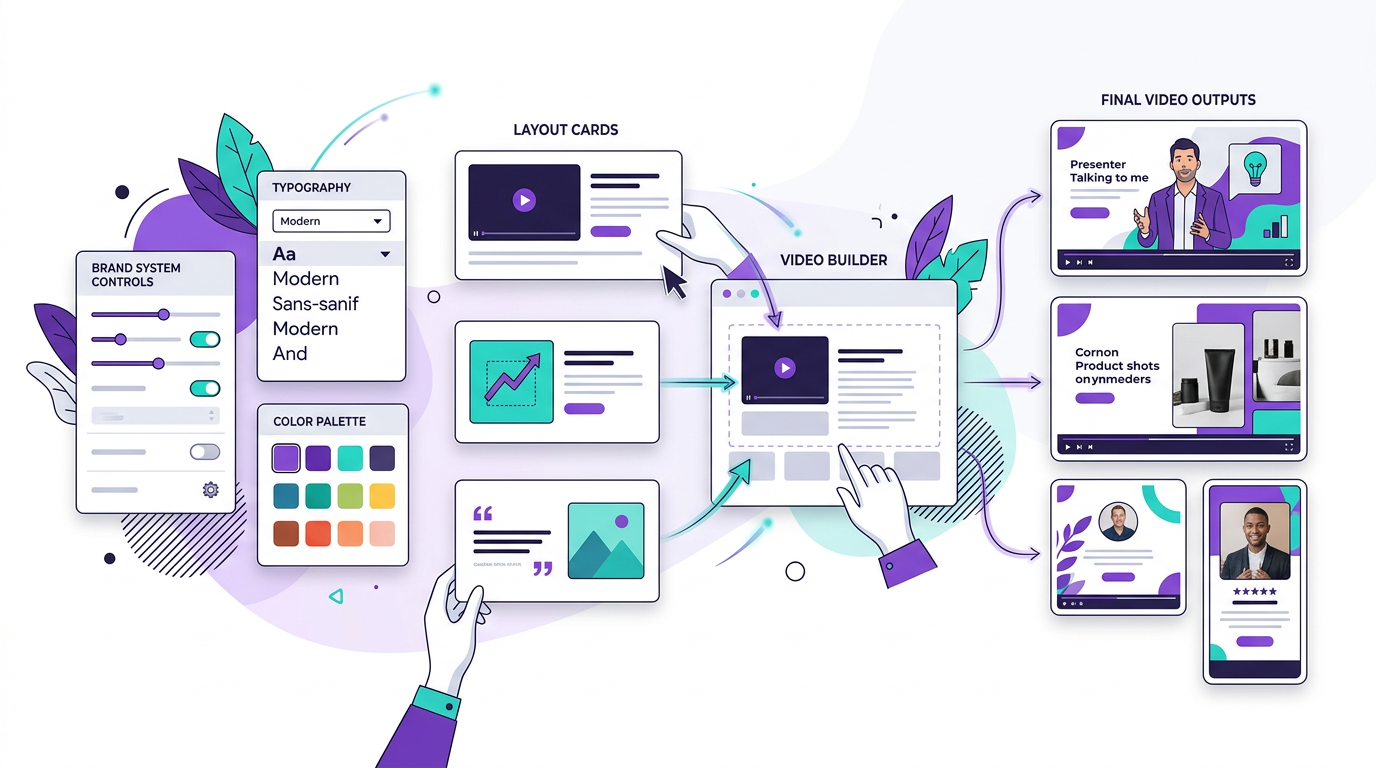
A real custom template does more than swap one accent color. It should define the parts of the experience that viewers repeatedly notice: typography, background treatment, card surfaces, visual density, CTA styling, and motion behavior.
The goal is not to make every video identical. The goal is to make every video recognizably yours even when the underlying topic, layout, or scene sequence changes.
- Brand colors for accents, backgrounds, surfaces, and text contrast
- Heading and body typography that matches the website or brand kit
- Scene components such as hero frames, metrics, cards, and CTAs
- Motion style so transitions feel consistent across every video
- Reusable defaults that apply across long-form videos and portrait cuts
Why content teams benefit more than solo one-off creators
Content teams care about throughput, but they also care about recognition. A repeatable template system means different people can publish videos without each person making their own design decisions from scratch.
That reduces review overhead. Instead of checking every asset for colors, typography, card styling, and CTA treatment, the team can focus on message quality because the visual system is already standardized.
It also makes cross-channel repurposing easier. The same branded template can support YouTube explainers, embedded article videos, and short-form derivatives without losing the identity that ties them together.
How Blog2Video handles custom templates
Blog2Video gives you two ways to build a custom template. You can paste your website URL and let the platform extract your colors, fonts, and visual identity automatically, or you can open Template Studio and define the brand system manually.
Once the template exists, it becomes reusable infrastructure. Future blog-to-video projects can inherit the same visual identity without rebuilding the style layer every time. That is what makes custom templates a publishing tool, not just a design feature.
Financial research firms can turn house research into a visual system
Investment research teams usually publish recurring formats: market notes, earnings breakdowns, sector updates, macro summaries, and thesis-driven explainers. Those formats benefit from a template that feels restrained, credible, and data-first rather than overly promotional.
An existing template like Gridcraft is a strong starting point when the content leans on comparisons, metrics, and structured takeaways. If the firm already has a recognizable research brand, a custom template can go further by matching its presentation style, typography, color hierarchy, and the card layouts analysts already use in reports and decks.
- Use Gridcraft when the story depends on comparisons, data snapshots, and structured argument flow
- Use Newspaper when you want a more editorial market-brief or weekly-research look
- Build a custom template when the firm wants videos to match its website, research portal, or pitch-deck identity
- Best fit for recurring content like earnings recaps, sector deep dives, macro outlooks, and analyst explainers
Political journalists and independent commentators need recurring editorial formats
Political coverage works best when the format feels consistent from episode to episode. Viewers should immediately recognize the difference between a news recap, a fact-check, an opinion breakdown, and a timeline of events. Templates help create that repeatability without rebuilding the show every time.
The built-in Newspaper template is the most natural fit for this kind of work because it already supports headlines, pull quotes, fact-first framing, and timeline-driven storytelling. A custom template becomes useful when the creator wants the video to feel like an extension of their publication, newsletter, or commentary brand rather than a generic news layout.
- Use Newspaper for explainers, issue recaps, debate summaries, and fact-check style videos
- Use Spotlight when the format is more opinionated, punchy, and built around big statements
- Build a custom template when the channel has a distinct editorial identity, recurring segments, or signature on-screen framing
- Best fit for weekly political roundups, policy explainers, investigative commentary, and campaign coverage
Healthcare professionals benefit from templates that prioritize trust and clarity
Healthcare content often needs to feel calm, precise, and easy to follow. Whether the audience is patients, clinicians, administrators, or medical sales teams, the visual system should support comprehension first. That usually means cleaner layouts, careful typography, and structured scene patterns for steps, definitions, and summaries.
An existing template like Geometric Explainer works well for educational content, process walkthroughs, and treatment or workflow explanations. A custom template is the better choice when a clinic, hospital, health brand, or medical practice wants the video to reflect its own visual identity and maintain a more consistent trust signal across patient education and professional communication.
- Use Geometric Explainer for patient education, protocol walkthroughs, and study or treatment summaries
- Use Gridcraft when the content relies on outcomes, comparisons, or evidence snapshots
- Build a custom template when you want brand-matched colors, typography, and a calmer visual tone across all videos
- Best fit for patient education libraries, clinician briefings, care-pathway explainers, and practice marketing content
Frequently Asked Questions
Who should use a custom video template instead of a built-in one?
Teams and creators publishing repeatedly benefit the most. If you want your videos to feel recognizably tied to your site, product, or newsletter over time, a custom template is usually the better long-term system.
Do custom templates make production slower?
Usually the opposite. There is some setup up front, but after that the template removes repeated styling work from every future video. That makes recurring production faster and more consistent.
Can I still use different layouts inside a custom template?
Yes. A good custom template keeps the brand system stable while allowing different scene types, layouts, and content structures inside it.
Can Blog2Video generate a custom template from my website?
Yes. Blog2Video can extract colors, typography, and visual cues from your website URL, then turn those inputs into a reusable branded video template.
Is a custom template only useful for large teams?
No. Solo creators also benefit when they want every video, article embed, and social cut to feel like part of the same brand rather than a collection of disconnected assets.